> For the complete documentation index, see [llms.txt](https://docs.oxapay.com/llms.txt). Markdown versions of documentation pages are available by appending `.md` to page URLs; this page is available as [Markdown](https://docs.oxapay.com/welcome-to-oxapay/integrations/make-automation/discord-bot.md).
# Discord Bot
This integration lets you connect OxaPay with Discord using Make. By combining OxaPay’s payment and invoicing system with Discord bots or channels, you can automate payment alerts and order confirmations. It also enables real-time user interactions for a smoother and faster payment experience.
### Using **OxaPay** and **Discord** together on **Make**, you can:
* Trigger real-time Discord alerts when a transaction is confirmed
* Create OxaPay invoices and send payment links automatically via Discord DM or channel
* Fulfill digital orders instantly (e.g., license keys, access links, roles) after successful payment
* Send reminder messages for pending invoices and notify users of failed or expired payments
### Example Automation Scenarios
{% stepper %}
{% step %}
#### **Scenario 1:** Customer Payment Confirmation Flow
When OxaPay marks a transaction as **Paid**, Make sends a personalized Discord DM to the customer with payment details, order ID, and next-step instructions.
{% endstep %}
{% step %}
#### **Scenario 2:** High Value Transaction Monitoring
If a payment exceeds a defined amount, an alert is posted instantly in a private Discord staff channel so admins can review and process priority orders faster.
{% endstep %}
{% step %}
#### **Scenario 3:** Invoice Reminder & Status Updates
After an invoice is created in OxaPay, the payment link is sent to the customer on Discord, followed by automatic reminders before expiry and a final status update (Paid/Expired/Failed).
{% endstep %}
{% step %}
#### **Scenario 4:** Digital Delivery After Verification
Once payment is confirmed, Make triggers automatic delivery of digital products (license key, download link, or access role) through Discord without manual intervention.
{% endstep %}
{% endstepper %}
### Discord Payment Bot with OxaPay Scenario
This scenario builds a Discord payment bot integrated with OxaPay through Make, allowing merchants to create payment requests directly inside Discord. With simple bot actions, users can generate invoice links, white-label payment addresses, and receive instant Discord notifications when a payment is confirmed.
**You can download the scenario blueprint file below:**
{% file src="/files/RDs2V7wnp69GyevK0e8Z" %}
### **Before starting, make sure you have:**
* An active OxaPay account with API access
* A **Discord bot token** created in the Discord Developer Portal
* A Make account with access to Data Store
### How to build and configure this **Discord** payment bot using **Make**?
1. After logging in to your Discord account, go to [**https://discord.com/developers/applications**](https://discord.com/developers/applications). Click **New Application**, enter your desired application name, and then click **Create**.
2. After creating the application, click **Bot** in the left sidebar. In the bot settings, under **Privileged Gateway Intents**, enable **Message Content Intent**, then click **Save Changes**.
3. On the same **Bot** page, go to **Token** section and copy your bot token. If the token is not visible, click **Reset Token** to generate and reveal a new one, then copy it immediately. Keep this token secure and never share it.
4. In the left sidebar, click **Installation**. Under **Default Install Settings → Guild Install**, open **Scopes** and add **bot**. Then, in **Permissions**, select **Administrator**, and click **Save Changes**.
5. Use the generated **Install Link** to install your application on the target Discord server. Select the server, review the requested permissions, and click **Authorize**.
6. In your Make dashboard, click **Create a new scenario** to start building the automation flow.
7. In the top-right corner, click the three-dot menu, then choose "**Import blueprint"** and upload the downloaded scenario file.
8. Once the scenario canvas opens, add a **Discord** module and click it to configure. In the configuration window, click **Create a connection.**
9. In the window that opens, enable **Advanced Settings**. Enter your bot token, then under **Bot Permissions**, click **Select All** and press **Save**. On the authorization page, choose your target server and click **Authorize**.
10. Now, click on each **module** one by one and complete the required **connection** and configuration steps.
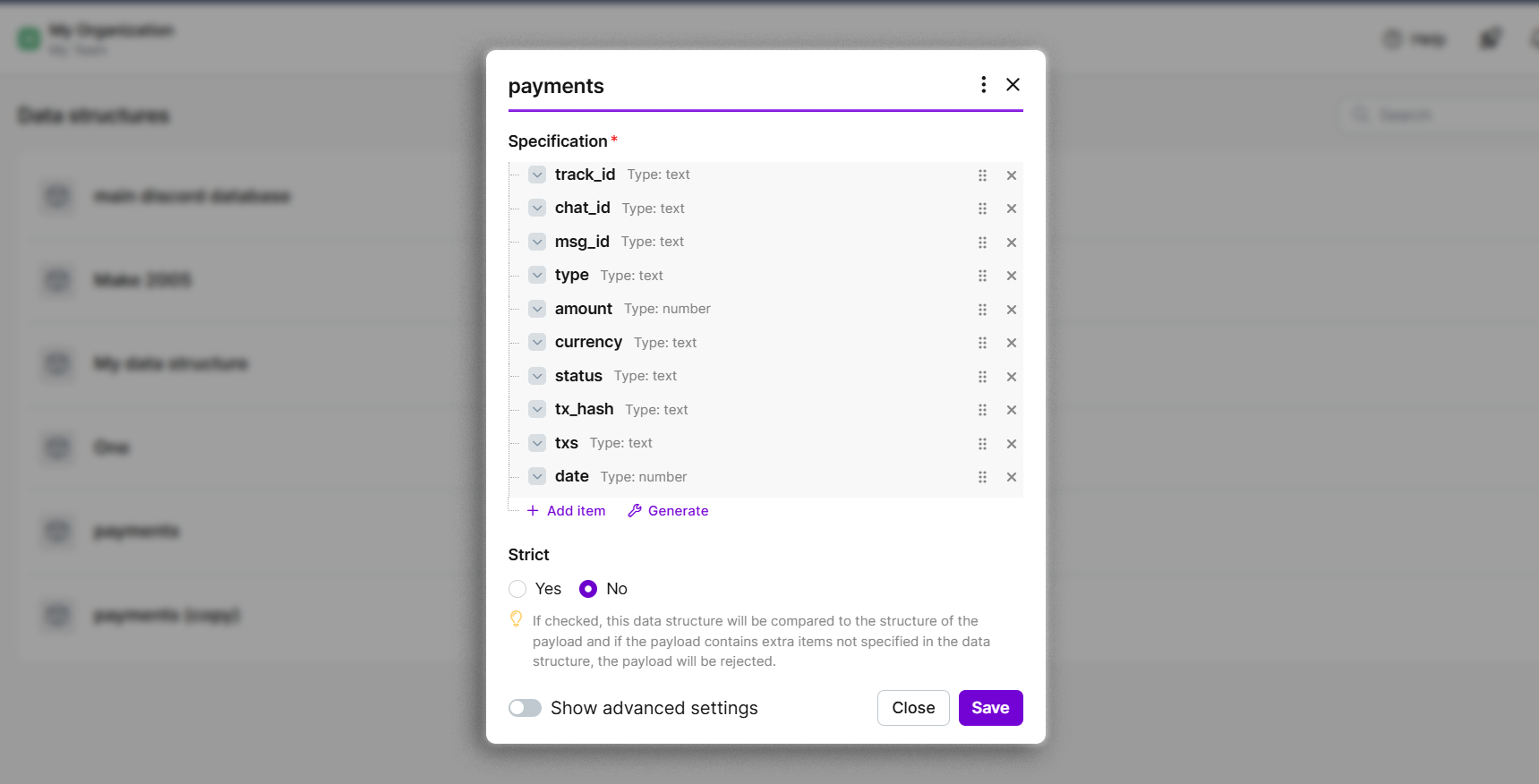
11. In the "**Data Store**" module, you need to connect it to a database with the following structure.
12. After configuring all modules, click **Save** to store the scenario. Then open the **Webhooks** module, copy the webhook URL, and keep this address. (you’ll need it in the next steps)
13. Deploy the Python script on an active server. Before running it, replace:
* `YOUR_DISCORD_BOT_TOKEN` with your actual Discord bot token
* `YOUR_MAKE_WEBHOOK_URL` with your Make webhook URL
For security, keep both values private and load them from environment variables instead of hardcoding them in the script.
{% file src="/files/yMG74Z2NLncCkB3TSh5l" %}
14. Whenever you want to create a new payment, simply send a message containing keywords like “**OxaPay**”, “**Invoice**”, or “**Crypto**” in a channel where the bot is active. The bot will automatically trigger and run the payment workflow.
15. For real-time payment status notifications, create a separate scenario and import the blueprint file below into a new scenario.
{% file src="/files/JWv26n6dwyZTEP4exa9V" %}
16. In the "**Data Store**" module in this scenario, you need to connect it to a database with the following structure.
17. Once all modules are configured, copy the webhook URL from the "**Watch Payment Webhook**" module and add it to the Callback URL of all OxaPay modules that create invoices or payment requests in the previous scenario. Finally, save and activate the scenario.
### Conclusion and Next Steps
**With these two Make scenarios configured, you now have a fully functional Discord payment bot powered by OxaPay:**
* **Scenario 1** manages user interaction in Discord and creates payment invoices through OxaPay.
* **Scenario 2** listens for real-time OxaPay webhook updates and automatically posts payment status notifications in Discord.
#### **This setup can be extended even further by:**
* **Automatically delivering digital products or access credentials** after a successful payment confirmation
* **Recording transactions in external systems** such as Google Sheets, Airtable, or your CRM for reporting and reconciliation
* **Implementing retry and fallback logic** for expired, underpaid, or failed invoices to improve payment recovery rates
By combining **OxaPay, Discord, and Make**, you can build flexible, scalable crypto payment automations without writing custom backend code.

.png?alt=media&token=b96c70b2-ad84-438d-980f-86a7231f469f)
.png?alt=media&token=cbeb71fa-cd5c-49bd-8a91-8c72fa48d4c8)
.png?alt=media&token=3d91a16c-40f4-4c3a-a309-e08d8a3c54a8)
.png?alt=media&token=5a74ded4-46c2-4681-9e2f-43a44cbfbb25)
.png?alt=media&token=3f194aaf-493d-48b6-a191-54ab4850736b)
.png?alt=media&token=2e0fc01e-492f-4cda-93ba-7dbefe88c22b)
.png?alt=media&token=62b77507-3da9-46a2-afc7-ca072ff883b5)
.png?alt=media&token=8c18f268-c23f-4ae6-995d-552df008a8fc)
.png?alt=media&token=e1af9531-cca9-4802-9c94-e56f9ff1ab99)
.png?alt=media&token=36f29d55-b370-466c-8cc6-5036d9a296f0)
.png?alt=media&token=5b862ba8-d8e3-454b-ad49-af93f9dd0380)